





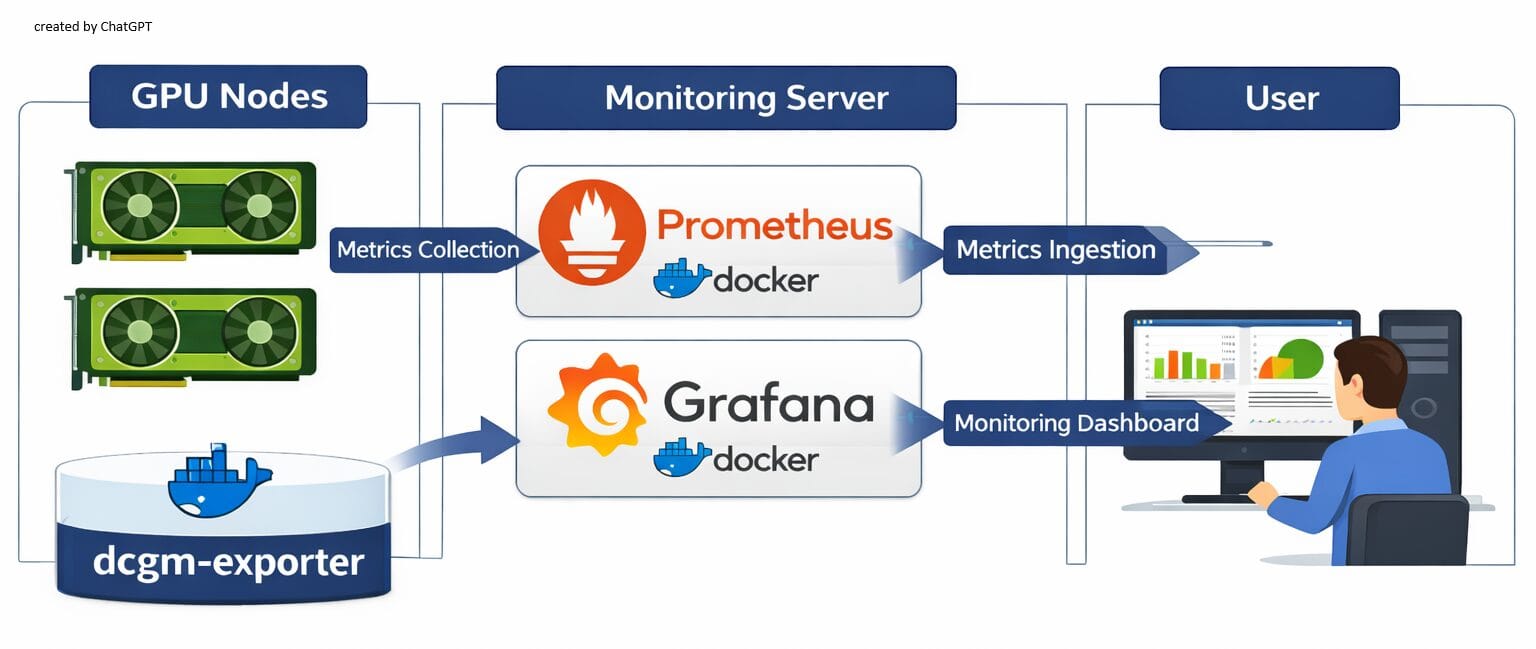
개인 장비에서 다양한 AI 모델을 시험하다 보니 GPU 자원을 얼마나 사용하는지 소비 전력이나 온도 상승은 어느 정도인지 GPU 모니터링 필요성이 느껴졌습니다. 이에 간단히 구성 가능한 방식으로 NVIDIA 공식 + 오픈소스 기반으로 GPU 사용량 모니터링을 하는 시스템을 구성해 보았습니다. nvidia의 DCGM(DataCenter GPU Manager), Prometheus (GPU Metric 수집), Grafana (Dashboard) 구성입니다.
모니터링은 모니터링 대상인 GPU 설치 장비와 대시보드용 서버로 구성합니다. 모든 GPU 설치 장비에는 서버의 Prometheus로 데이터를 전달하기 위한 dcgm-exporter 설정을, 서버 장비에는 Prometheus와 Grafana를 설정합니다.
GPU 장비 준비
NVIDIA Container Toolkit 설치
Docker instance 내부에서 nvidia-smi 명령 수행 등 nvidia GPU 자원 접근을 위해서는 nvidia-container-toolkit 설치가 필요합니다. 이미 Container Toolkit을 설치했다면 아래와 같이 설치한 package 정보가 보이고, 설치하지 않았다면 아무런 출력이 없습니다. Container Toolkit 설치를 학인했다면 DCGM 설치를 시작합니다.
(참고) Installing the NVIDIA Container Toolkit
$ dpkg -l | grep nvidia-container-toolkit
nvidia-container-toolkit-base/unknown,now 1.18.1-1 amd64 [installed,automatic]
nvidia-container-toolkit/unknown,now 1.18.1-1 amd64 [installed]nvidia Container Toolkit 설치를 위해 우선 Nvidia GPG Key를 설치합니다.
curl -fsSL https://nvidia.github.io/libnvidia-container/gpgkey | sudo gpg --dearmor -o /usr/share/keyrings/nvidia-container-toolkit-keyring.gpg \
  && curl -s -L https://nvidia.github.io/libnvidia-container/stable/deb/nvidia-container-toolkit.list | \
    sed 's#deb https://#deb [signed-by=/usr/share/keyrings/nvidia-container-toolkit-keyring.gpg] https://#g' | \
sudo tee /etc/apt/sources.list.d/nvidia-container-toolkit.listContainer Toolkit 를 설치합니다.
$ export NVIDIA_CONTAINER_TOOLKIT_VERSION=1.18.1-1
  sudo apt-get install -y \
      nvidia-container-toolkit=${NVIDIA_CONTAINER_TOOLKIT_VERSION} \
      nvidia-container-toolkit-base=${NVIDIA_CONTAINER_TOOLKIT_VERSION} \
      libnvidia-container-tools=${NVIDIA_CONTAINER_TOOLKIT_VERSION} \
libnvidia-container1=${NVIDIA_CONTAINER_TOOLKIT_VERSION}Docker 설정 파일을 수정
$ sudo nvidia-ctk runtime configure --runtime=docker
INFO[0000] Config file does not exist; using empty config
INFO[0000] Wrote updated config to /etc/docker/daemon.json
INFO[0000] It is recommended that docker daemon be restarted.
docker 서비스를 재시작.
$ sudo systemctl restart dockerDCGM 설치
nvidia DCGM 시작하기 를 참고하여 설치합니다.
- OS: ubuntu 24.04
- GPU: RTX 4060 Ti 8GB
1. nvidia drvier와 CUDA 버전을 확인
$ nvidia-smi -q | grep -E 'Driver Version|CUDA Version
Driver Version                            : 580.105.08
CUDA Version : 13.02. nvidia datacenter gpu manager 설치. CUDA_VERSION 환경 변수는 Major version 인 “13” 으로 지정.
$ CUDA_VERSION=13
$ sudo apt-get install --yes \
                       --install-recommends \
datacenter-gpu-manager-4-cuda${CUDA_VERSION}3. 선택 사항이라고 하지만 일단 설치
sudo apt install --yes datacenter-gpu-manager-4-multinode-cuda${CUDA_VERSION}4. 선택 사항이지만 설치.
sudo apt install --yes datacenter-gpu-manager-4-devDCGM 서비스 기동
1. 서비스 등록
datacenter-gpu-manager package 설치에 포함되어 있는 nvidia-dcgm를 서비스 등록합니다.
sudo systemctl --now enable nvidia-dcgm2. 서비스 실행 확인
$ sudo systemctl status nvidia-dcgm
● nvidia-dcgm.service - NVIDIA DCGM service
     Loaded: loaded (/usr/lib/systemd/system/nvidia-dcgm.service; enabled; preset: enabled)
     Active: active (running) since Thu 2025-12-11 13:18:28 KST; 5s ago
   Main PID: 1467089 (nv-hostengine)
      Tasks: 15 (limit: 38094)
     Memory: 16.6M (peak: 17.2M)
        CPU: 161ms
     CGroup: /system.slice/nvidia-dcgm.service
             └─1467089 /usr/bin/nv-hostengine -n --service-account nvidia-dcgm

Dec 11 13:18:28 AI systemd[1]: Started nvidia-dcgm.service - NVIDIA DCGM service.
Dec 11 13:18:28 AI nv-hostengine[1467089]: DCGM initialized
Dec 11 13:18:28 AI nv-hostengine[1467089]: Started host engine version 4.4.2 using port num3. dcgmi 명령 실행 시험
$ dcgmi discovery -l
1 GPU found.
+--------+----------------------------------------------------------------------+
| GPU ID | Device Information                                                   |
+--------+----------------------------------------------------------------------+
| 0      | Name: NVIDIA GeForce RTX 4060 Ti                                     |
|        | PCI Bus ID: 00000000:01:00.0                                         |
|        | Device UUID: GPU-e57cb625-81b0-b3ec-9d6f-281b6ffdd924                |
+--------+----------------------------------------------------------------------+
0 NvSwitches found.
+-----------+
| Switch ID |
+-----------+
+-----------+
0 ConnectX found.
+----------+
| ConnectX |
+----------+
+----------+
0 CPUs found.
+--------+----------------------------------------------------------------------+
| CPU ID | Device Information                                                   |
+--------+----------------------------------------------------------------------+
dcgm-exporter
1. Docker 에서 GPU 감지 여부 확인
docker run --rm --gpus all nvidia/cuda:13.0.2-base-ubuntu24.04 nvidia-smi아래와 같이 nvidia-smi 실행 결과가 정상 출력하면 성공이고, docker: Error response from daemon: could not select device driver "" with capabilities: [[gpu]]. 오류가 발생하면 nvidia Container Toolkit 설치가 되어 있는지 다시 확인하십시오.
Status: Downloaded newer image for nvidia/cuda:13.0.2-base-ubuntu24.04
Thu Dec 11 04:31:51 2025
+-----------------------------------------------------------------------------------------+
| NVIDIA-SMI 580.105.08             Driver Version: 580.105.08     CUDA Version: 13.0     |
+-----------------------------------------+------------------------+----------------------+
| GPU  Name                 Persistence-M | Bus-Id          Disp.A | Volatile Uncorr. ECC |
| Fan  Temp   Perf          Pwr:Usage/Cap |           Memory-Usage | GPU-Util  Compute M. |
|                                         |                        |               MIG M. |
|=========================================+========================+======================|
|   0  NVIDIA GeForce RTX 4060 Ti     On  |   00000000:01:00.0 Off |                  N/A |
|  0%   32C    P8              5W /  160W |      77MiB /   8188MiB |      0%      Default |
|                                         |                        |                  N/A |
+-----------------------------------------+------------------------+----------------------+

+-----------------------------------------------------------------------------------------+
| Processes:                                                                              |
|  GPU   GI   CI              PID   Type   Process name                        GPU Memory |
|        ID   ID                                                               Usage      |
|=========================================================================================|
|  No running processes found                                                             |
+-----------------------------------------------------------------------------------------+docker-compose.yml 작성
services:
  dcgm-exporter:
    # 공식 예제에서 사용하는 NGC 이미지 (권장)
    # 필요하면 태그를 최신으로 바꿀 수 있음
    image: nvcr.io/nvidia/k8s/dcgm-exporter:4.4.2-4.7.1-ubuntu22.04
    container_name: dcgm-exporter
    restart: unless-stopped

    # NVIDIA Container Toolkit 사용 시
    runtime: nvidia
    environment:
      - NVIDIA_VISIBLE_DEVICES=all
      - NVIDIA_DRIVER_CAPABILITIES=all

    cap_add:
      - SYS_ADMIN

    ports:
      - "9400:9400"   # Prometheus가 여기로 접속

    # (옵션) DCGM 설정 파일이나 카운터 CSV를 커스터마이징할 경우 볼륨 사용
    # volumes:
    #   - ./dcgm-counters.csv:/etc/dcgm-exporter/default-counters.csv
docker instance 실행 한 후, 오류가 없다면 localhost:9400 접속했을 때, GPU Exporter 를 출력합니다.
$ curl http://localhost:9400
<html>
			<head><title>GPU Exporter</title></head>
			<body>
			<h1>GPU Exporter</h1>
			<p><a href="./metrics">Metrics</a></p>
			</body>
			</html>